Site Settings
The NCTR Secure Record Transfer application allows administrators to configure various settings through the Django admin interface without requiring code changes. These settings control default values for metadata fields, email configurations, and other application behaviors.
Note
Site settings vs. Environment variables: The settings documented here are
different from the environment variables documented in Application Settings.
Site settings can be changed through the admin interface and take effect immediately
without requiring application restart or redeployment. Environment variables, on the
other hand, require modifying .env files and restarting the application.
Accessing Site Settings
To access and modify site settings:
Log in to the Django admin interface at
/admin/Navigate to Record Transfer → Site Settings
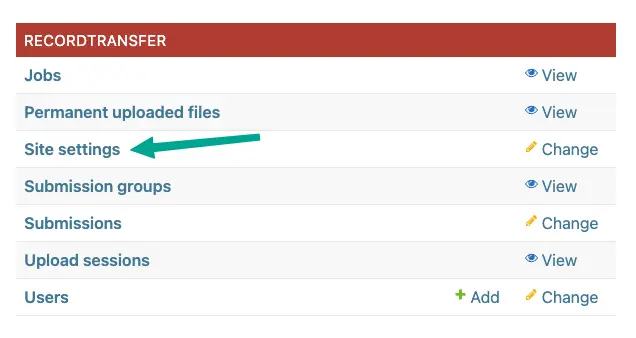
Click on the setting you want to modify

Update the Value field with your desired configuration
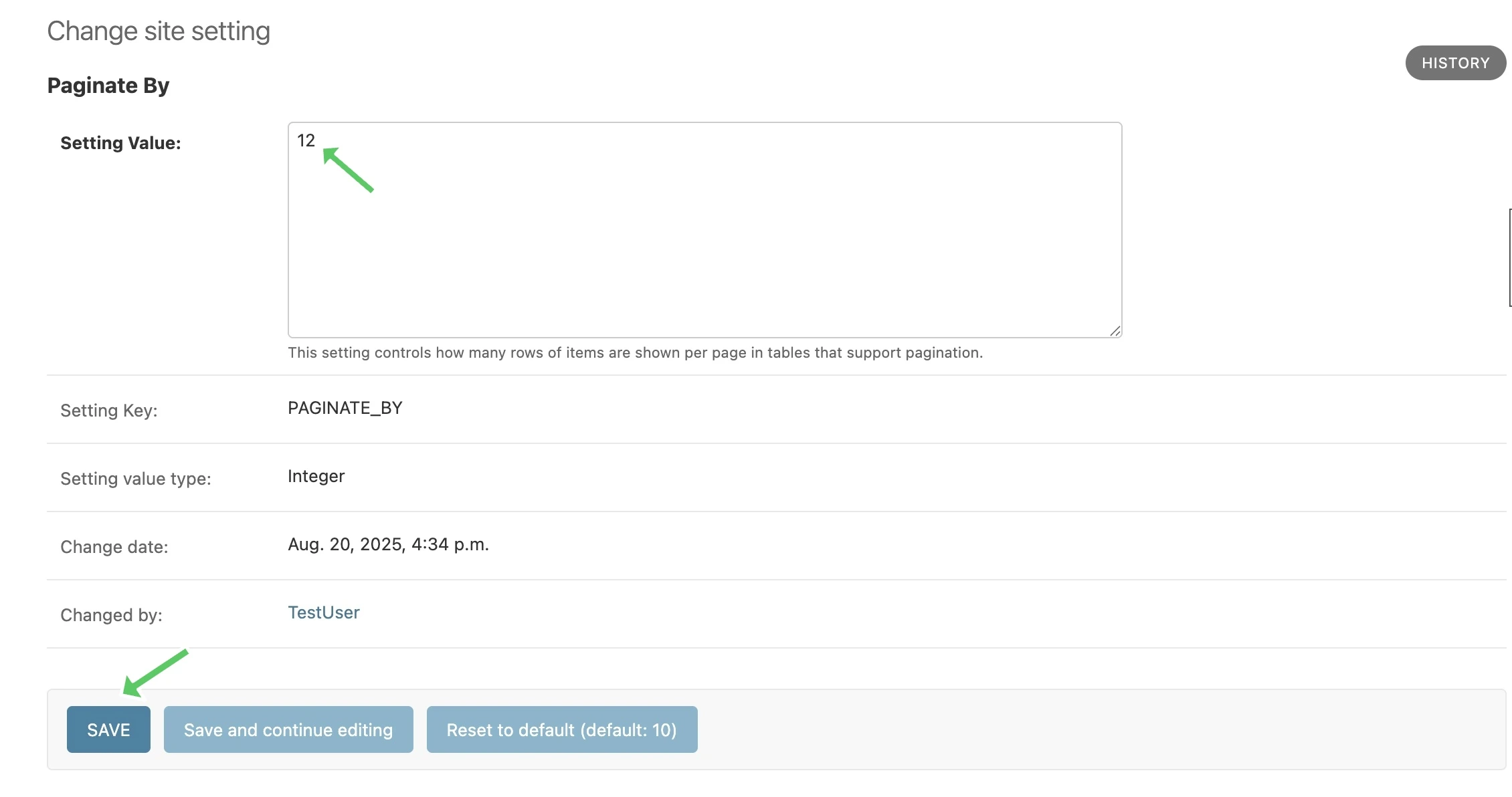
Click Save to apply the changes
Resetting to Default
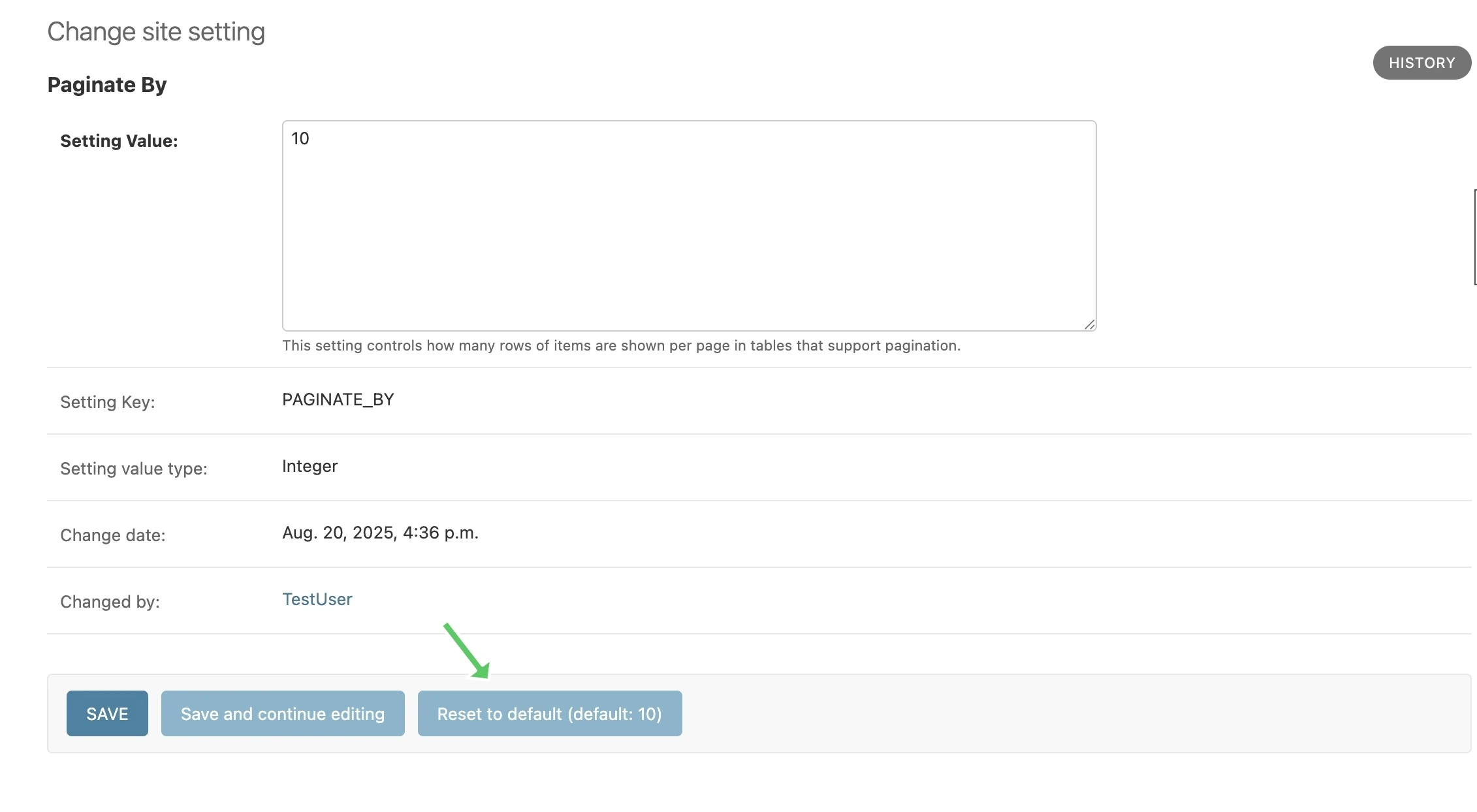
To reset a site setting to its default value, on the edit page, click the Reset to Default button. The button label includes the default value that will be restored, so you can review it before proceeding. This will restore the setting to its original value as defined in the application code.
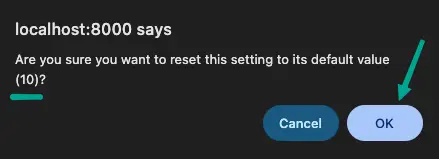
A confirmation dialog will appear to ensure you want to proceed with the reset, which will include the default value for the setting. Click OK to confirm.
Note
Only the Value field can be modified. The Key and Value Type fields are read-only to maintain system integrity.
Warning
Changes to site settings take effect immediately and may affect the behavior of the application for all users. Always test changes in a development environment before applying them to production.
Available Settings
The following settings can be configured through the admin interface:
Email Settings
ARCHIVIST_EMAIL
Type: String
Default: archivist@example.com
The email address displayed for people to contact an archivist. This email is shown to users throughout the application when they need to contact archival staff.
DO_NOT_REPLY_USERNAME
Type: String
Default: “do-not-reply”
A username for the application to send “do not reply” emails from. This username is combined with the site’s base URL to create an email address. The URL can be set from the admin site.
Pagination Settings
PAGINATE_BY
Type: Integer
Default: 10
This setting controls how many rows of items are shown per page in tables that support pagination. Must be a positive whole number.
CAAIS Default Settings
These settings provide default values for various CAAIS (Canadian Archival Accession Information Standard) metadata fields.
CAAIS_DEFAULT_REPOSITORY
Type: String
Default: None
Default value to fill in metadata for CAAIS section 1.1 - Repository.
CAAIS_DEFAULT_ACCESSION_TITLE
Type: String
Default: None
Default value to fill in metadata for CAAIS section 1.3 - Accession Title.
CAAIS_DEFAULT_ARCHIVAL_UNIT
Type: String
Default: None
Default value to fill in metadata for CAAIS section 1.4 - Archival Unit.
Note
While the Archival Unit field is repeatable in CAAIS, it is not possible to specify multiple archival unit defaults.
CAAIS_DEFAULT_ACQUISITION_METHOD
Type: String
Default: None
Default value to fill in metadata for CAAIS section 1.5 - Acquisition Method.
CAAIS_DEFAULT_STATUS
Type: String
Default: None
Default value to fill in metadata for CAAIS section 1.7 - Status.
Leave empty, or populate with a term like ‘Waiting for review’ to signify that the metadata has not been reviewed yet.
CAAIS_DEFAULT_SOURCE_CONFIDENTIALITY
Type: String
Default: None
Default value to fill in metadata for CAAIS section 2.1.6 - Source Confidentiality.
If a default is supplied, the source confidentiality will be applied to every source of material received.
CAAIS_DEFAULT_PRELIMINARY_CUSTODIAL_HISTORY
Type: String
Default: None
Default value to fill in metadata for CAAIS section 2.2 - Preliminary Custodial History.
Note
While the Preliminary Custodial History field is repeatable in CAAIS, it is not possible to specify multiple defaults here.
CAAIS_DEFAULT_DATE_OF_MATERIALS
Type: String
Default: None
Default value to fill in metadata for CAAIS section 3.1 - Date of Materials.
CAAIS_DEFAULT_EXTENT_TYPE
Type: String
Default: None
Default value to fill in metadata for CAAIS section 3.2.1 - Extent Type.
If a default is supplied, the extent type will be applied to every extent statement received.
CAAIS_DEFAULT_QUANTITY_AND_UNIT_OF_MEASURE
Type: String
Default: None
Default value to fill in metadata for CAAIS section 3.2.2 - Quantity and Unit of Measure.
If a default is supplied, the quantity and unit of measure will be applied to every extent statement received.
CAAIS_DEFAULT_CONTENT_TYPE
Type: String
Default: None
Default value to fill in metadata for CAAIS section 3.2.3 - Content Type.
If a default is supplied, the content type will be applied to every extent statement received.
CAAIS_DEFAULT_CARRIER_TYPE
Type: String
Default: None
Default value to fill in metadata for CAAIS section 3.2.4 - Carrier Type.
If a default is supplied, the carrier type will be applied to every extent statement received.
CAAIS_DEFAULT_EXTENT_NOTE
Type: String
Default: None
Default value to fill in metadata for CAAIS section 3.2.5 - Extent Note.
If a default is supplied, the extent note will be applied to every extent statement received.
CAAIS_DEFAULT_PRELIMINARY_SCOPE_AND_CONTENT
Type: String
Default: None
Default value to fill in metadata for CAAIS section 3.3 - Preliminary Scope and Content.
Note
While the Preliminary Scope and Content field is repeatable in CAAIS, it is not possible to specify multiple defaults here.
CAAIS_DEFAULT_LANGUAGE_OF_MATERIAL
Type: String
Default: None
Default value to fill in metadata for CAAIS section 3.4 - Language of Material.
CAAIS_DEFAULT_STORAGE_LOCATION
Type: String
Default: None
Default value to fill in metadata for CAAIS section 4.1 - Storage Location.
CAAIS_DEFAULT_PRESERVATION_REQUIREMENTS_TYPE
Type: String
Default: None
Default value to fill in metadata for CAAIS section 4.3.1 - Preservation Requirements Type.
If not empty, a default preservation requirements statement will be applied to each submission.
CAAIS_DEFAULT_PRESERVATION_REQUIREMENTS_VALUE
Type: String
Default: None
Default value to fill in metadata for CAAIS section 4.3.2 - Preservation Requirements Value.
If not empty, a default preservation requirements statement will be applied to each submission.
CAAIS_DEFAULT_PRESERVATION_REQUIREMENTS_NOTE
Type: String
Default: None
Default value to fill in metadata for CAAIS section 4.3.3 - Preservation Requirements Note.
If not empty, a default preservation requirements statement will be applied to each submission.
CAAIS_DEFAULT_APPRAISAL_TYPE
Type: String
Default: None
Default value to fill in metadata for CAAIS section 4.4.1 - Appraisal Type.
If not empty, a default appraisal statement will be applied to each submission.
CAAIS_DEFAULT_APPRAISAL_VALUE
Type: String
Default: None
Default value to fill in metadata for CAAIS section 4.4.2 - Appraisal Value.
If not empty, a default appraisal statement will be applied to each submission.
CAAIS_DEFAULT_APPRAISAL_NOTE
Type: String
Default: None
Default value to fill in metadata for CAAIS section 4.4.3 - Appraisal Note.
If not empty, a default appraisal statement will be applied to each submission.
CAAIS_DEFAULT_ASSOCIATED_DOCUMENTATION_TYPE
Type: String
Default: None
Default value to fill in metadata for CAAIS section 4.5.1 - Associated Documentation Type.
If not empty, a default associated document will be applied to each submission.
CAAIS_DEFAULT_ASSOCIATED_DOCUMENTATION_TITLE
Type: String
Default: None
Default value to fill in metadata for CAAIS section 4.5.2 - Associated Documentation Title.
If not empty, a default associated document will be applied to each submission.
CAAIS_DEFAULT_ASSOCIATED_DOCUMENTATION_NOTE
Type: String
Default: None
Default value to fill in metadata for CAAIS section 4.5.3 - Associated Documentation Note.
If not empty, a default associated document will be applied to each submission.
CAAIS_DEFAULT_GENERAL_NOTE
Type: String
Default: None
Default value to fill in metadata for CAAIS section 6.1 - General Note.
CAAIS_DEFAULT_RULES_OR_CONVENTIONS
Type: String
Default: None
Default value to fill in metadata for CAAIS section 7.1 - Rules or Conventions.
CAAIS_DEFAULT_LANGUAGE_OF_ACCESSION_RECORD
Type: String
Default: None
Default value to fill in metadata for CAAIS section 7.3 - Language of Accession Record.
CAAIS Event Default Settings
These settings control the default values for events that are automatically created when submissions are received.
CAAIS_DEFAULT_SUBMISSION_EVENT_TYPE
Type: String
Default: “Transfer Submitted”
Default submission event type name - related to CAAIS section 5.1.1.
At the time of receiving a submission, a ‘Submission’ type event is created for the submission. You can control the Event Type name for that event here.
CAAIS_DEFAULT_SUBMISSION_EVENT_AGENT
Type: String
Default: None
Default submission event agent - related to CAAIS section 5.1.3.
At the time of receiving a submission, a ‘Submission’ type event is created for the submission. You can control the Event Agent’s name for that event here.
CAAIS_DEFAULT_SUBMISSION_EVENT_NOTE
Type: String
Default: None
Default submission event note - related to CAAIS section 5.1.4.
At the time of receiving a submission, a ‘Submission’ type event is created for the submission. You can control whether an Event Note is added for the event here.
CAAIS Creation Default Settings
These settings control the default values for creation events that are automatically created when submissions are received.
CAAIS_DEFAULT_CREATION_TYPE
Type: String
Default: “Creation”
Default date of creation event name - related to CAAIS section 7.2.1.
At the time of receiving a submission, a Date of Creation or Revision is created to indicate the date the accession record was created. You can control the name of the event here if you do not want to call it ‘Creation’.
CAAIS_DEFAULT_CREATION_AGENT
Type: String
Default: None
Default date of creation event agent - related to CAAIS section 7.2.3.
At the time of receiving a submission, a Date of Creation or Revision is created to indicate the date the accession record was created. You can control the name of the event agent here.
CAAIS_DEFAULT_CREATION_NOTE
Type: String
Default: None
Default date of creation event note - related to CAAIS section 7.2.4.
At the time of receiving a submission, a Date of Creation or Revision is created to indicate the date the accession record was created. You can add a note to that event here by setting the value to something other than an empty string.
Settings Validation
The application performs validation on setting values to ensure data integrity:
String Settings: - Must contain non-empty text - Leading and trailing whitespace is preserved
Integer Settings: - Must be valid whole numbers - For pagination settings, must be positive numbers greater than zero
Email Settings: - Must be valid email addresses (for ARCHIVIST_EMAIL)
See also
For information on adding new settings programmatically, see the developer
documentation at SiteSetting.